March 29, 2026 | 5 min read
How Review Cycles Work
Eventact supports two distinct models for evaluating abstracts, organized into Review Cycles. A cycle is a self-contained review unit: it has its own type, settings, reviewer pool, and assigned abstracts. You can run multiple cycles simultaneously - for example, one for oral presentations and another for posters.
- Two Types of Review |
- Step 1: Create a Cycle |
- Step 2: Add Reviewers |
- Step 3: Contest Setup (Ranking only) |
- Step 4: Assign Abstracts |
- Step 5: Invite Reviewers |
- Results and Decisions
Two Types of Review
When creating a cycle you choose one of two review formats:
- Individual Review (Absolute): Each reviewer evaluates every assigned abstract independently, scoring it based on its own merit using numeric scores, criteria ratings, and written comments. Reviewers access a dedicated Reviewer portal - a separate web application for reviewers only.
- Competitive Ranking (Relative): Reviewers rank the abstracts assigned to them from best to worst, without scoring each one individually. This is a contest format - reviewers participate through the Eventact Event App using the Rank Voting feature, rather than the reviewer portal.
The setup steps are mostly the same for both types, with one extra step required for the contest format (see Step 3).
Step 1: Create a Review Cycle
Navigate to Reviews > Reviews Overview. Click Add Cycle to create a new cycle.
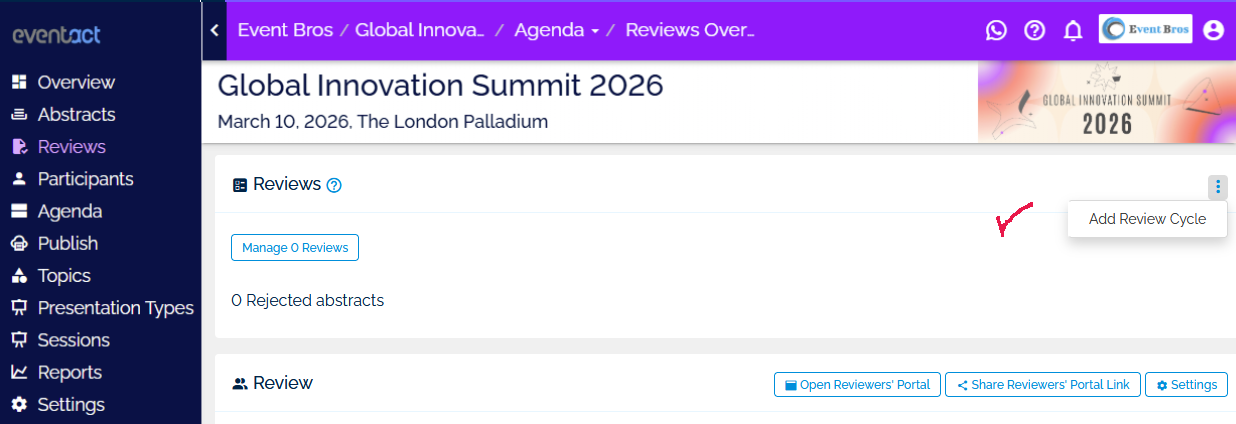
In the cycle settings, configure the following:
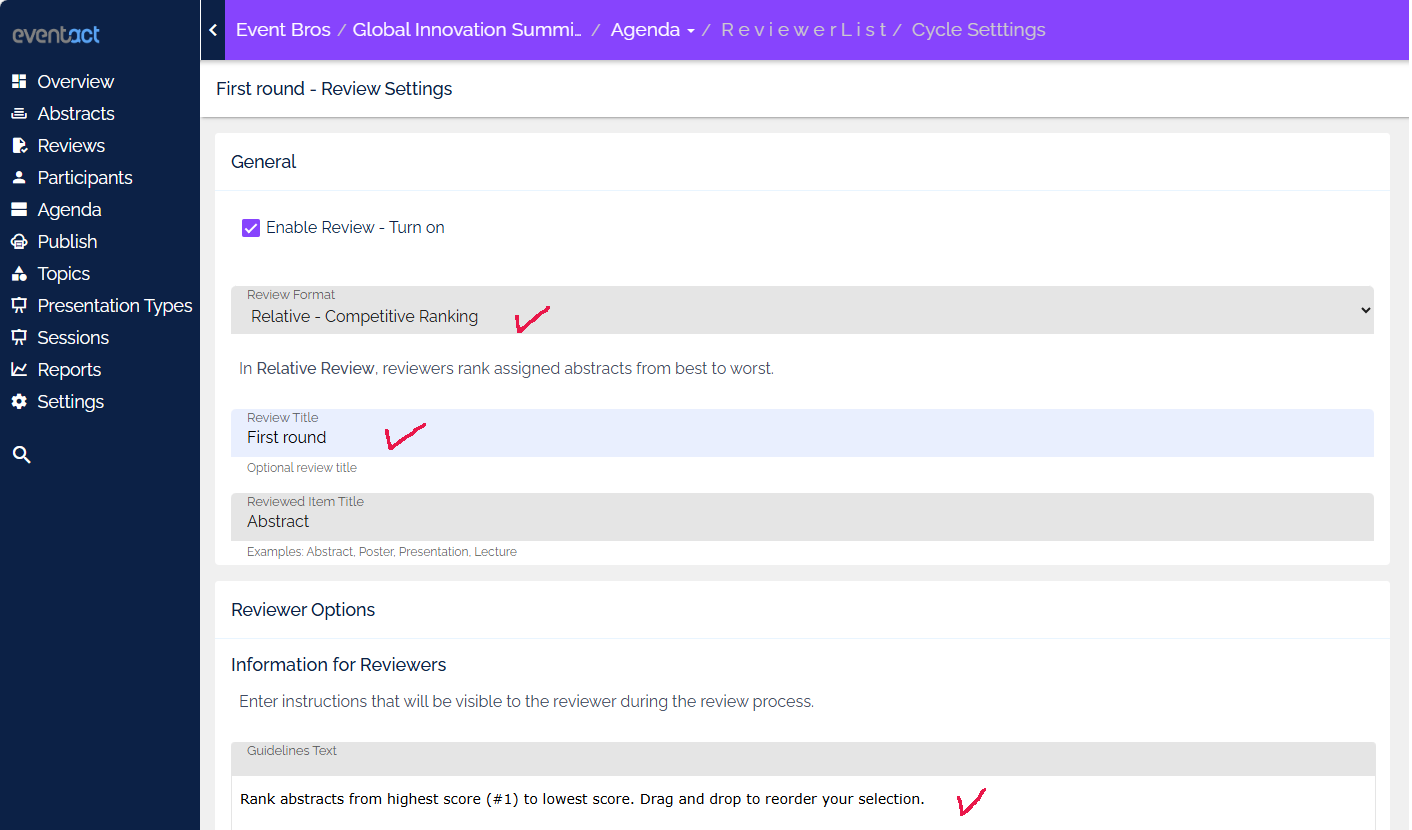
- Review Format: Choose Absolute – Individual Review or Relative – Competitive Ranking.
- Review Title: An optional label for the cycle (e.g., "Oral Track Review", "Poster Contest").
- Reviewed Item Title (Ranking only): The name of the item being ranked, such as "Abstract", "Poster", or "Presentation".
- Assignment Method: Manual (admin assigns abstracts) or Automatic (system assigns on submission, based on topic matching and reviewer workload limits).
- Reviews Required per Abstract (Individual only): How many reviewers must evaluate each submission.
- Number of Positions / Minimum Rankings (Ranking only): Define how many top positions exist and how many items each reviewer must rank before submitting.
For Individual Review, you can also configure reviewer permissions: whether authors' names are revealed, whether reviewers can request revisions, decline due to conflict of interest, add internal remarks, or discuss abstracts with other reviewers.
Step 2: Add Reviewers to the Cycle
Go to Reviews > Reviewers & Committee Members and click Edit, then select Add Reviewer. You can search for an existing contact or create a new one.
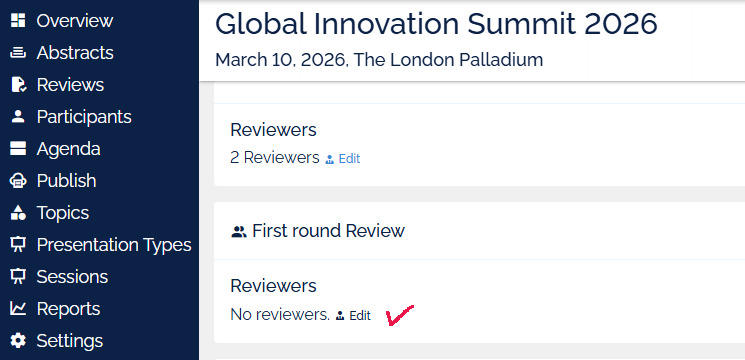
When adding a reviewer, set the following:
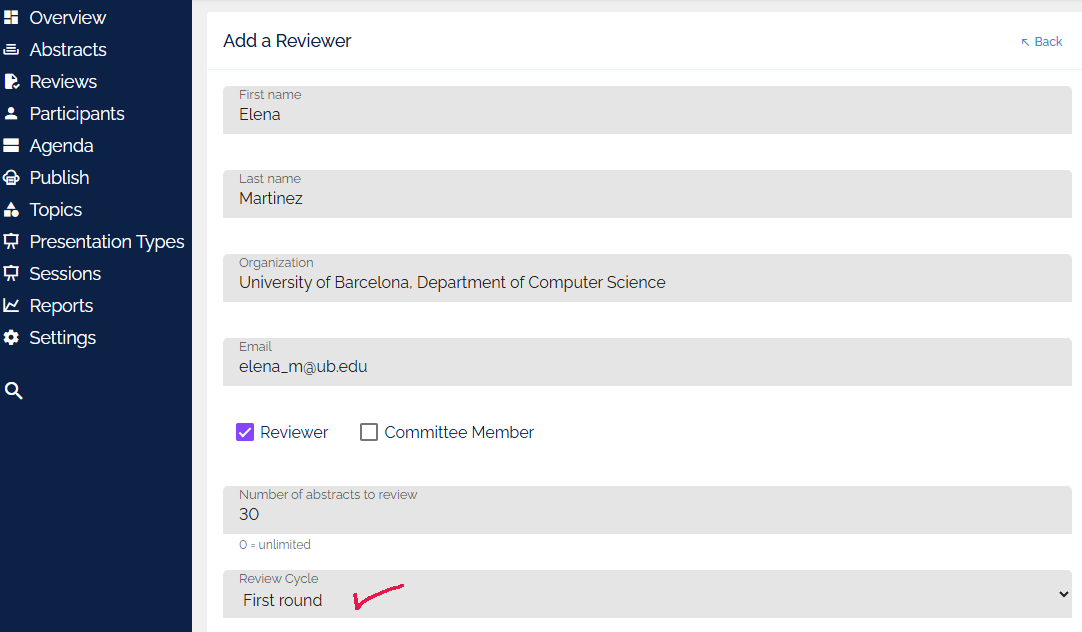
- Role: Mark the person as a Reviewer, a Committee Member, or both.
- Review Cycle: Assign the reviewer to the relevant cycle.
- Number of Abstracts to Review: Set a cap on how many abstracts this reviewer can be assigned (0 = unlimited).
- Topics of Expertise: Select the topics this reviewer specializes in. The system uses these for automatic assignment and manual assignment suggestions.
Repeat this process for all reviewers. You can have as many reviewers and as many cycles as your event requires.
Step 3: Contest App Setup (Competitive Ranking only)
Because Competitive Ranking uses the Eventact Event App rather than the reviewer portal, two additional steps are required before reviewers can participate:
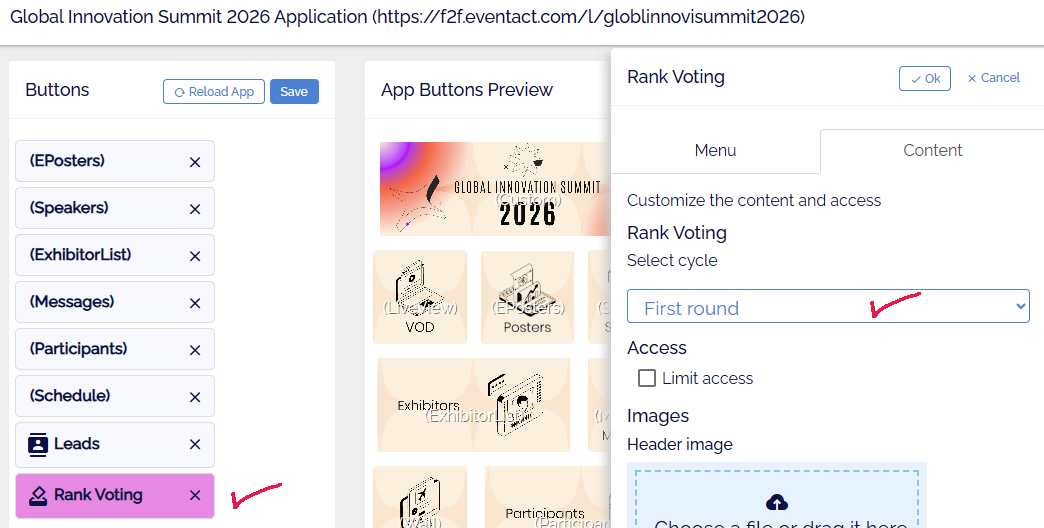
Add the Rank Voting Feature to the App
In the Event App management area, go to the app's feature list and add the Rank Voting feature. This enables the contest voting interface within the app. In the feature's Content tab, select the review cycle this contest should use.
Add Reviewers as App Participants
Each reviewer must be registered as a participant in the event app so they can log in and access the Rank Voting feature. Add them as participants via the Event App participants list.
Step 4: Assign Reviewers to Abstracts
Once reviewers are set up, distribute abstracts to them. You can do this manually or let the system handle it automatically, depending on the assignment method chosen in the cycle settings.
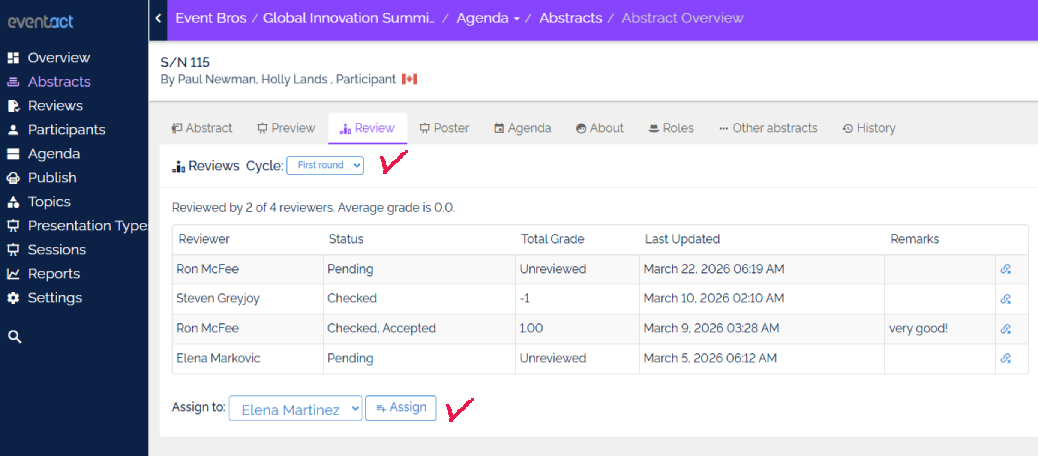
- Manual: Browse the abstracts list, select the ones you want, and assign them to a specific reviewer.
- Automatic: The system distributes abstracts based on topic matching, reviewer capacity limits, and balanced workload allocation.
Step 5: Create and Send Reviewer Invitations
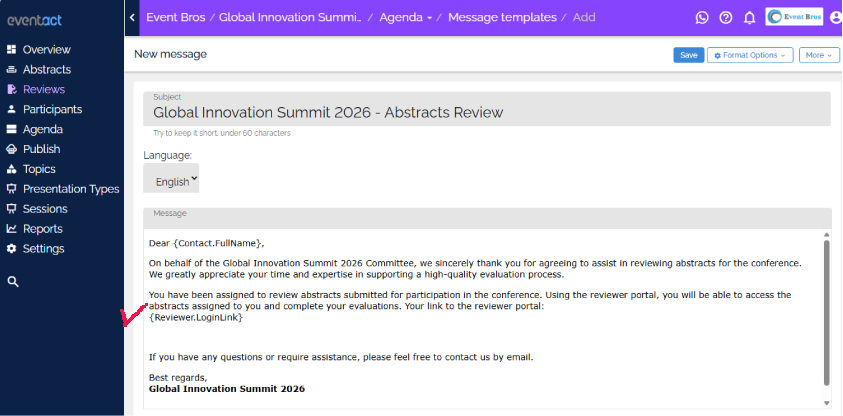
Go to Reviews > Messages and create a message template for the cycle. The message must include the correct login link token - the token differs by review type:
-
Individual Review (reviewer portal): Use the token
{Reviewer.LoginLink}- this generates each reviewer's personal login link to the reviewer portal. -
Competitive Ranking (event app): Use the token
{Participant.LoginLink}- this generates each participant's personal login link to the event app.
{Reviewer.LoginLink}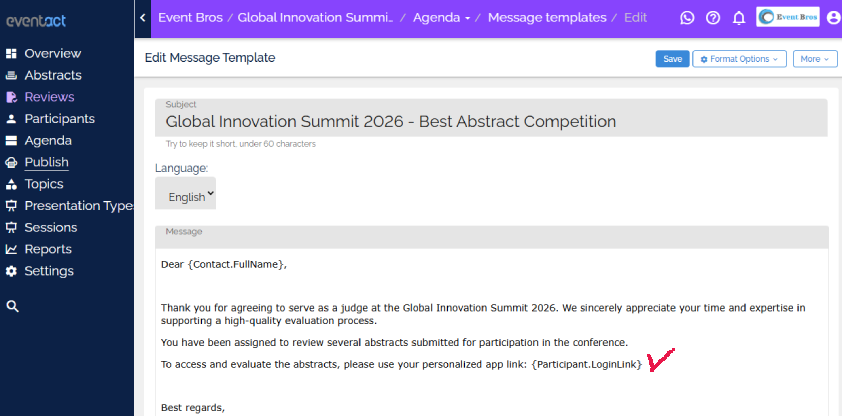
{Participant.LoginLink}Once the message is ready, select the relevant reviewers from the list and use the Bulk Actions menu to send it.
The Reviewer Portal (Individual Review)
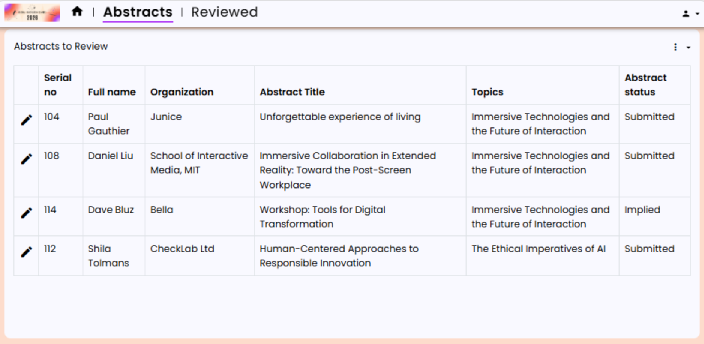
Reviewers who receive a portal link log in to a dedicated, secure web interface where they see only the abstracts assigned to them. They score each abstract using the evaluation criteria defined in the cycle settings and can optionally leave written feedback.
Rank Voting in the Event App (Competitive Ranking)
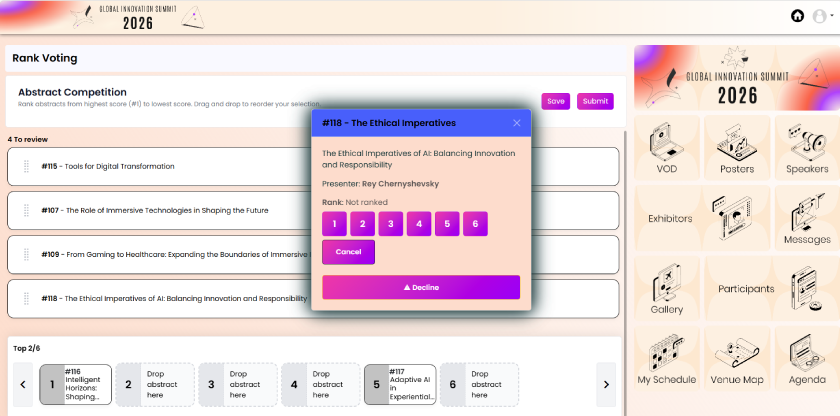
Reviewers who receive an app login link open the Eventact Event App and navigate to the Rank Voting feature. There they see the abstracts assigned to them and drag them into their preferred order, ranking the best submissions at the top. Once they have placed the required minimum number of items, they can submit their ranking.
Results and Final Decisions
After reviewers have completed their evaluations, the results are aggregated in the backoffice:
- Individual Review: Each abstract shows its average score, individual reviewer scores, and any written comments. The organization reviews this data and sets a final status for each abstract: Approved, Rejected, or Change of Presentation Type.
- Competitive Ranking: The system aggregates all reviewer rankings into a combined leaderboard. The organization uses the ranked results to make final decisions on which abstracts to accept and in what presentation format.
Because you can run multiple cycles, it is possible to combine both review methods for a single event - for example, using individual scoring for a first-round quality check and competitive ranking for a final selection contest. Additionally, you are not limited to just two review types - you can also use the same review type across different cycles while applying different review forms, allowing you to tailor the evaluation criteria at each stage of the review process.
The Reviews page also includes built-in report views, and additional dedicated reports - All Abstract Reviews, Abstract Reviews, Competition Results, and Competition Summary - are available via the More Reports link on that page.